Layers and drawables
Everything drawn belongs to a layer, and every layer belongs to a scene:
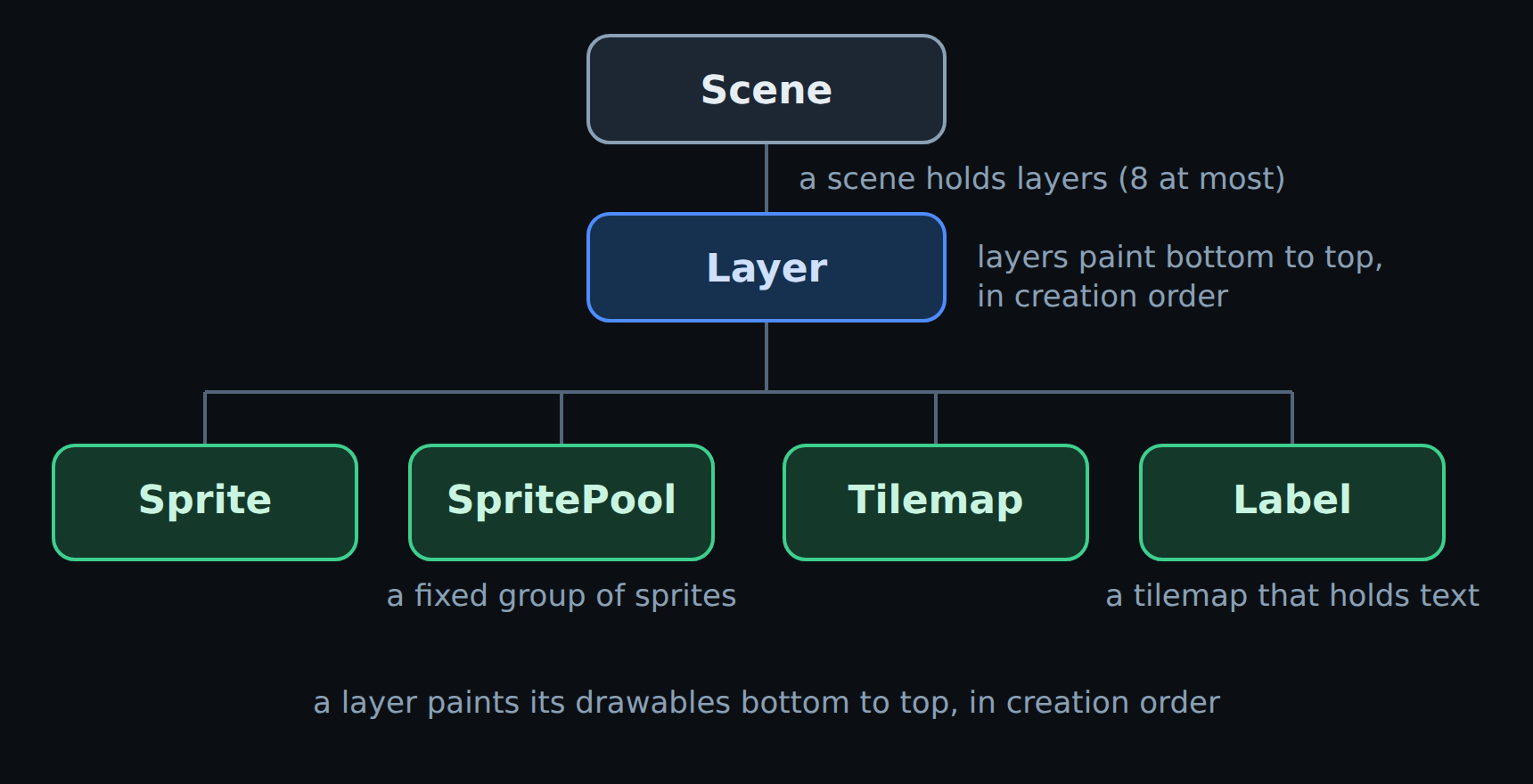
How a scene is put together.
Layers create their own drawables — there is no free-standing Sprite(...) —
and the projection belongs to the layer, not to its drawables.
All drawables share x, y, visible, show() and hide(). Coordinates are
signed and fractional. X is an angle that wraps at vs2.display.width
(256), and Y is measured inward from the rim. What Y means depends on the
layer’s projection; see the circular display.
Layer
- class vs2.Layer(scene, name, projection, visible)[source]
Bases:
objectAn ordered group of drawables sharing one projection.
Created by
Scene.layer(), never directly. A layer owns its drawables: they are created throughsprite(),sprite_pool(),tilemap()andlabel(), which allocate and attach in one step, so a drawable that nothing draws cannot exist.Within a layer, drawables paint in creation order — each one over those created before it — and layers themselves paint in the order the scene created them. Sprites, tilemaps and labels interleave freely:
ground = world.tilemap("ground.png", columns=8, rows=17)
player = world.sprite("ship.png")
clouds = world.tilemap("clouds.png", columns=8, rows=4)
That paints ground, then the player, then clouds over both.
- property projection
How this layer maps Y to LEDs –
TUNNEL,HUDorFULLSCREEN. Writable at runtime, e.g. a radar layer that flips between tunnel and HUD.
- property visible
Whether the whole layer draws. Toggling it touches no drawable.
- sprite(image, x=0, y=0, frame=0, visible=True, flip_x=False, flip_y=False)[source]
Create one sprite on this layer. Only callable from
build().- Parameters:
image – An image name or an
Imagehandle.x – Angle. 0 is the bottom of the disc, 64 left, 128 top, 192 right; wraps at
vs2.display.width.y – Distance inward from the rim, where 0 is the outermost LED. Its range follows the layer’s projection:
0..53on HUD,0..255(depth) on TUNNEL and FULLSCREEN.frame – Initial frame, validated against the image’s frame count.
visible – Whether it draws. Independent of
frame.flip_x – Mirror horizontally.
flip_y – Mirror vertically.
- Returns:
Sprite – The new sprite.
- Raises:
SceneSealedError – If called outside
build().ResourceLimitError – If the scene is out of sprite slots.
FrameError – If
frameis out of range for the image.
- sprite_pool(image, count, frame=0, on_empty=None)[source]
Create a fixed group of interchangeable sprites.
All
countsprites are allocated here, hidden, so the budget is spent visibly and up front in one reviewable number. Nothing is allocated when they later spawn and despawn.- Parameters:
image – An image name or an
Imagehandle.count – How many sprites to reserve. Must be at least 1.
frame – Initial frame for every sprite in the pool.
on_empty – What
SpritePool.spawn()does when the pool is exhausted.NonereturnsNone— “no free bullet this frame” is a game rule, not an error.vs2.RECYCLEreuses the oldest live sprite instead, which is what explosions and particles usually want.
- Returns:
SpritePool – The new pool, with every sprite hidden.
- Raises:
SceneSealedError – If called outside
build().ResourceLimitError – If the scene cannot fit
countmore sprites.
- tilemap(image, columns, rows, cells=None, x=0, y=0, view_width=None, view_height=None, view_x=0, view_y=0, visible=True, flip_x=False, flip_y=False)[source]
Create a grid of tiles drawn from one tileset image.
Tile size comes from the image, so it can never disagree with it.
- Parameters:
image – The tileset. One frame per distinct tile.
columns – Grid width in tiles.
rows – Grid height in tiles.
cells – An existing
bytearrayofcolumns * rowstile indices to draw from. Omit it and one is allocated, filled withvs2.EMPTY_TILE. Pass your own to keep object identity with a buffer the game already owns.x – Angle of the map’s origin; 0 is the bottom of the disc.
y – Distance of the origin inward from the rim, 0 being the outermost LED.
view_width – Width of the on-screen window onto the map. Defaults to the whole map.
view_height – Height of that window. Defaults to the whole map.
view_x – Horizontal scroll offset into the map.
view_y – Vertical scroll offset into the map.
visible – Whether it draws.
flip_x – Mirror the complete visible viewport horizontally.
flip_y – Mirror the complete visible viewport vertically.
- Returns:
Tilemap – The new tilemap.
- Raises:
SceneSealedError – If called outside
build().ResourceLimitError – If the scene is out of tilemap slots.
ValueError – On a
FULLSCREENlayer, which cannot draw tilemaps, or ifcellsis the wrong length.
- label(image, columns, rows=1, x=0, y=0, text=None, glyphs=None, visible=True, flip_x=False, flip_y=False)[source]
Create a text label: a tilemap you write strings into.
A label costs one tilemap record and
columns * rowsbytes no matter how often the text changes, where the same text as individual sprites would cost one sprite per character.Characters map to frames through a glyph table, resolved once here in this order: an explicit
glyphsargument, then aglyphs:entry declared beside the strip in__images__.yaml, then CP437 (frame = ord(ch)). Unmappable characters and spaces becomevs2.EMPTY_TILE, which the renderer skips.- Parameters:
image – The font strip. One frame per glyph.
columns – Width in characters.
rows – Height in lines. One-line labels get the
Label.textproperty.x – Angle; 0 is the bottom of the disc.
y – Distance inward from the rim, 0 being the outermost LED. Text is most legible at low Y, near the rim.
text – Initial text for a one-line label.
glyphs – A charmap such as
"0123456789/-", whereframe = glyphs.index(ch). Include" "to get a real space glyph on fonts with opaque backgrounds.visible – Whether it draws.
flip_x – Mirror the complete label horizontally.
flip_y – Mirror the complete label vertically. Set both flips to rotate a label 180 degrees without changing its font strip.
- Returns:
Label – The new label.
- Raises:
SceneSealedError – If called outside
build().ResourceLimitError – If the scene is out of tilemap slots. Labels count against the tilemap budget.
ValueError – On a
FULLSCREENlayer.
Sprite
- class vs2.Sprite(layer, image, x, y, frame, visible, flip_x, flip_y)[source]
Bases:
objectOne movable image on a layer.
Created by
Layer.sprite()or handed out by aSpritePool, never directly. Writing tox,y,frame,visible,flip_x,flip_yorimagegoes straight into the renderer’s record and allocates nothing, so moving sprites every tick is free.frameandvisibleare independent, which is what makes priming a pooled sprite two plain statements:shot.frame = BULLET_FRAME # still hidden shot.show() # now visible, same frame
- property layer
The
Layerthat draws this sprite. Read-only for its whole life, so draw order is never ambiguous.
- property image
The sprite’s
Image. Assigning a name or handle swaps the artwork, keepingframeif it is still in range and resetting it to 0 otherwise.
- property x
Angle around the disc – 0 at the bottom, 64 left, 128 top, 192 right – wrapping at
vs2.display.width. Fractional values are kept: the renderer stores signed 8.8 fixed point.
- property y
Distance inward from the rim, where 0 is the outermost LED.
What it means follows the layer’s projection. On a
HUDlayer it is a direct LED index,0..53. On aTUNNELlayer it is depth,0..255: 0 is the outer rim and 255 is the centre.FULLSCREENuses that same curve as radial extent: 0 fills the disc and increasing values contract toward the centre. Out-of-range values clip. Fractional values are kept.
- property frame
Which animation frame to draw. Never changes
visible.- Raises:
FrameError – If the frame is out of range for the image.
- property flip_x
Mirror the sprite horizontally.
- property flip_y
Mirror the sprite vertically.
- property width
Frame width from the image metadata. Read-only, no renderer call.
- property height
Frame height from the image metadata. Read-only, no renderer call.
- overlaps(other)[source]
Whether this sprite’s box overlaps
other’s.An axis-aligned test that allocates nothing. X wraps around the display, so a sprite straddling column 0 still collides correctly; Y does not wrap, because the disc has an inside and an outside.
- first_overlap(sprites)[source]
Return the first sprite in
spritesthat overlaps this one.Accepts any iterable, including a
SpritePool, which is the common case:baddie = shot.first_overlap(self.baddies) if baddie: self.baddies.despawn(baddie)
- Returns:
Sprite or None – The first overlapping sprite, or
None.
SpritePool
- class vs2.SpritePool(sprites, on_empty)[source]
Bases:
objectA fixed group of interchangeable sprites, cycled without allocating.
Created by
Layer.sprite_pool(). Every operation is O(1) index bookkeeping — nothing allocates a Python object or a renderer record.Iterating yields only the live sprites, and despawning the current sprite mid-loop is supported, which is the pattern most games need. Y is depth on a
TUNNELlayer, so a shot fired away from the player counts up toward the centre and is retired at a depth the game picks:for shot in self.shots: shot.y += SHOT_SPEED if shot.y > SHOT_RANGE: self.shots.despawn(shot) continue baddie = shot.first_overlap(self.baddies) if baddie: self.baddies.despawn(baddie) self.booms.spawn(x=baddie.x, y=baddie.y) self.shots.despawn(shot)
len(pool)is the live count andfreeis the remainder.- spawn(x, y, frame=0, flip_x=False, flip_y=False)[source]
Take a free sprite, position it, show it, and return it.
- Parameters:
x – Angular position.
y – Radial position.
frame – Frame to show.
flip_x – Mirror horizontally.
flip_y – Mirror vertically.
- Returns:
Sprite or None – The spawned sprite.
Nonewhen the pool is exhausted and it was not created withon_empty=vs2.RECYCLE.
Tilemap
- class vs2.Tilemap(layer, image, columns, rows, cells, x, y, view_width, view_height, view_x, view_y, visible, flip_x=False, flip_y=False)[source]
Bases:
objectA grid of tiles drawn from one tileset image.
Created by
Layer.tilemap(). The grid itself is a flatbytearrayof tile indices incells, one byte per cell, addressed in(column, row)order — the same axis order as(x, y)everywhere else:self.ground[col, row] = ROCK tile = self.ground[col, row] self.ground.fill(GRASS) self.ground.cells[row * self.ground.columns + col] = ROCK # fastest
vs2.EMPTY_TILEleaves a cell blank and the renderer skips it.Scrolling moves the view over the grid rather than rewriting it, so it costs two scalar writes and allocates nothing:
self.ground.view_y = self.depth % self.ground.tile_height
- property columns
Grid width in tiles. Read-only.
- property rows
Grid height in tiles. Read-only.
- property tile_width
Width of one tile, taken from the image. Read-only.
- property tile_height
Height of one tile, taken from the image. Read-only.
- property cells
The flat
bytearrayof tile indices, row-major.Writable in place; the buffer itself cannot be replaced or resized while the map is active, because the renderer reads these bytes directly.
- property x
Angle of the map’s origin, 0 at the bottom of the disc, wrapping at
vs2.display.width.
- property y
Distance of the map’s origin inward from the rim, 0 being the outermost LED. Interpreted per the layer’s projection, like
vs2.Sprite.y.
- property view_x
Horizontal scroll offset into the grid. Writing it pans the view without touching
cells.
- property view_y
Vertical scroll offset into the grid. Writing it pans the view without touching
cells.
- property view_width
Width of the on-screen window onto the map. Read-only.
- property view_height
Height of the on-screen window onto the map. Read-only.
- property visible
Whether the tilemap draws.
- property flip_x
Whether the complete visible viewport is mirrored horizontally.
- property flip_y
Whether the complete visible viewport is mirrored vertically.
- __getitem__(position)[source]
Read one cell:
tile = tilemap[column, row].- Raises:
IndexError – If the cell is outside the grid.
Label
- class vs2.Label(layer, image, columns, rows, x, y, glyphs, visible, flip_x=False, flip_y=False)[source]
Bases:
TilemapA tilemap you write text into.
Created by
Layer.label(). Because it is a tilemap, a label counts against the tilemap budget rather than the sprite budget, and costs the same whether it shows two characters or twenty.The display stores tiles counter-clockwise, but a label handles that inversion internally: you write ordinary left-to-right strings and never see the reversed indices.
Only fixed-cell ASCII and CP437 are supported. There is no variable-width text, wrapping, or Unicode shaping.
- write(column, row, text, frame_offset=0, pad=True)[source]
Write
textstarting at(column, row).Touches only the bytes it changes and allocates nothing, so it is safe to call every tick. Text longer than the remaining columns is clipped.
frame_offsetshifts every glyph by a constant, which is how font strips that pack a second colour at a fixed offset are reached:self.status.write(3, 1, "ABXY", frame_offset=0x80)
- Parameters:
column – Starting column.
row – Row to write into.
text – The string. Non-strings are converted.
frame_offset – Added to each glyph’s frame index.
pad – When true, clear the rest of the row after the text. Set it false to overwrite in place without disturbing neighbours.
- Raises:
IndexError – If
columnorrowis outside the grid.
- property text
The label’s contents, for one-line labels only.
Reading maps the cells back through the glyph table and strips trailing blanks; writing truncates at
columnsand pads the rest withvs2.EMPTY_TILE:title = hud.label("rainbow437.png", columns=18, text="VS2 SPRITES") title.text = "GAME OVER"
- Raises:
AttributeError – On a label with more than one row. Use
write()there.
- set_number(value, width=1, pad='0')[source]
Write a right-aligned integer without building a string.
A score updated every tick this way costs no allocation at all, where
"%05d" % valuewould allocate a string per frame:self.score.set_number(value, width=5, pad="0")
Negative values clamp to zero, and values too large for
widthfill with nines rather than overflowing the label.- Parameters:
value – The number to display.
width – How many digit cells to use, starting at column 0.
pad – Character for leading blanks.
"0"zero-pads;" "leaves them blank.
- Raises:
ValueError – If
widthdoes not fit the label.
Image
- class vs2.Image(name, strip, metadata)[source]
Bases:
objectA resolved image from the scene’s asset pack.
Returned by
Scene.image()and carried by every drawable as itsimageattribute. Resolving a name once and reusing the handle avoids repeating the lookup, and lets one image back several drawables:def build(self): enemy = self.image("enemy.png") self.small = self.world.sprite_pool(enemy, count=12) self.boss = self.world.sprite(enemy, frame=4)
Attributes are read-only and come from the ROM’s metadata, so reading
widthorframescosts nothing at runtime.- name
The image’s name in the asset pack, e.g.
"ship.png".
- width
Width of a single frame, in display columns.
- height
Height of a single frame, in LEDs.
- frames
Number of animation frames. Valid frame indices are
0..frames-1.