3. Sprites
A sprite is one image on a layer. The layer creates it:
def build(self):
    world = self.layer("world", projection=vs2.TUNNEL)
    self.ship = world.sprite("ship.png", x=0, y=0)
Moving and animating
Every attribute writes straight into the renderer’s record, so these are cheap enough to do on every sprite, every tick:
def update(self):
    self.ship.x += 0.5              # angle; wraps at 256
    self.ship.y = 20                # depth on a TUNNEL layer; 0 is the rim
    self.ship.frame = (self.ship.frame + 1) % self.ship.image.frames
    self.ship.flip_x = self.moving_left
A sprite shows one frame of its strip at a time. The game’s ship has
three: one flying level and one turned to each side. Here are three sprites
showing frames 0 to 2 of ship.png, set side by side at the bottom of the disc
with a gap between them (frame 0, the level ship, is in the middle):
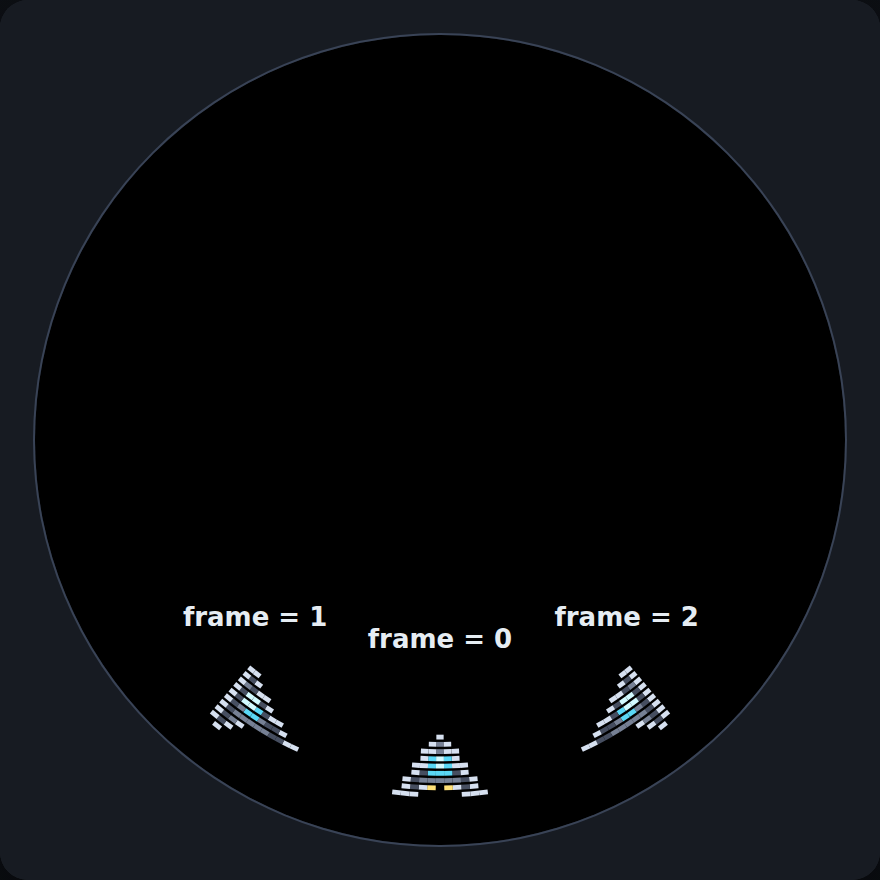
One strip, three poses of the same ship. The outer two are also tilted by where they sit on the disc, which is a circle: chapter 1 shows the three frames as they are drawn in the strip.
frame and visible are independent axes. Setting a frame never reveals a
hidden sprite, which is what lets you prepare something before showing it:
enemy.frame = ANGRY_FRAME    # still hidden
enemy.show()                 # now visible, same frame
An out-of-range frame raises at the assignment rather than rendering garbage:
FrameError: ship.png has 3 frames; frame must be 0..2
Frame counts and sizes
Don’t hard-code the number of frames. Image.frames
is read from the ROM, so it stays right when you add a frame to the PNG.
The same goes for size: width and
height come from the image:
self.ship.x = target.x - self.ship.width // 2 # centre on the target
Swapping the image
Assigning to image swaps the artwork in place. The frame
is kept if it is still in range, and reset to 0 if not:
self.ship.image = "ship_damaged.png"
Collisions
Two allocation-free axis-aligned tests, with the circular X handled for you:
if self.ship.overlaps(enemy):
    ...

target = self.ship.first_overlap(self.enemies)   # a Sprite, or None
if target:
    ...
first_overlap() takes any iterable of sprites, including a
pool — which is the next chapter.
Note
X wrapping is handled: a sprite straddling column 0 collides correctly with one at column 254. Y does not wrap, because the disc has an inside and an outside.
In the game
Make the ship lean into its turns. A frame can show state, here which way the ship is steering, so choose it from the buttons:
LEVEL, TURN_LEFT, TURN_RIGHT = range(3)      # the frames of ship.png

def update(self):
    # +1 for left, -1 for right, 0 for neither (or both held: they cancel).
    # At the bottom of the disc x counts up toward the left.
    steer = joy1.held(LEFT) - joy1.held(RIGHT)
    self.ship.x = (self.ship.x + steer) % vs2.display.width
    if steer > 0:
        self.ship.frame = TURN_LEFT
    elif steer < 0:
        self.ship.frame = TURN_RIGHT
    else:
        self.ship.frame = LEVEL
held() is true or false, so subtracting two of them gives the direction in one
line, and pressing both directions at once cancels out as it did in chapter 2. The
names for the frames make the code say what it means, and they are the same
three numbers the strip is laid out in. Setting a frame is a single write, so
it reuses the existing sprite record.
Note
At the bottom of the disc, where the ship flies, a sprite looks just like its PNG, so the frame for a left turn is the one whose nose points to the image’s left. Higher up the disc the whole picture is turned, and at the top it is upside down, as chapter 5 shows for text. If your own art leans the wrong way, swap the two frames.
The file so far
Everything from this chapter in one file, as it stands after chapter 3. If yours misbehaves, compare it
with this one. It is docs/vs2/tutorial/steps/step3_sprites.py in the repository.
# Trench Run, chapter 3: the ship leans into its turns.
import vs2
from vs2.controls import *

LEVEL, TURN_LEFT, TURN_RIGHT = range(3)      # the frames of ship.png


class Game(vs2.Scene):
    def build(self):
        self.world = self.layer("world", projection=vs2.TUNNEL)
        self.ship = self.world.sprite("ship.png", y=0)
        self.ship.x = -(self.ship.width // 2)     # centred on x = 0, the bottom of the disc

    def update(self):
        # +1 for left, -1 for right, 0 for neither (or both held: they cancel).
        # At the bottom of the disc x counts up toward the left.
        steer = joy1.held(LEFT) - joy1.held(RIGHT)
        self.ship.x = (self.ship.x + steer) % vs2.display.width
        if steer > 0:
            self.ship.frame = TURN_LEFT
        elif steer < 0:
            self.ship.frame = TURN_RIGHT
        else:
            self.ship.frame = LEVEL


def main():
    return Game()
Next: sprite pools, for everything you need many of. To share one image handle between several sprites, see going further.