6. Scenes, input and sound
Input
Two controllers, ten buttons, three methods:
from vs2.controls import *

if joy1.held(LEFT):            ...   # level: down right now
if joy1.just_pressed(A):       ...   # edge: went down this tick
if joy1.just_released(B):      ...   # edge: came up this tick
if joy2.just_pressed(START):   ...
held is a level and just_* are edges — true for
exactly one tick. Movement usually wants levels; fire, confirm and
menu-stepping want edges. Calling them several times per tick is free.
Buttons are LEFT RIGHT UP DOWN, A B X Y, START and BACK.
from vs2.controls import * imports exactly those plus joy1 and joy2.
Sound
vs2.audio.sound("boom")
vs2.audio.music("theme", loop=True)
vs2.audio.stop_music()
Names resolve against your game’s sounds/ folder. A name with a / is already
qualified, which is how you borrow: vs2.audio.sound("alecu.vyruss/shoot1").
Music keeps playing across scene changes inside your game and stops when the
game returns to the launcher. To stop it sooner, call stop_music().
Moving between scenes
A game is usually several scenes — a title, the game, a game-over. These calls are transitions:
self.push(PauseMenu())        # suspend this scene, run another on top
self.pop()                    # resume the scene below, or exit the game
self.switch(GameOver(score))  # replace this scene outright
All three return None, so return self.pop() reads as “handle this input,
then stop”.
A transition is queued and takes effect at the end of the tick, and queueing two in one tick raises an error. The details are in the scene reference.
State that should survive a scene being re-entered goes in __init__, which
runs once. Drawables must be created in build(), which runs on every entry:
class Game(vs2.Scene):
    def __init__(self):
        vs2.Scene.__init__(self)
        self.score = 0          # survives; not a drawable

    def build(self):
        self.hud = self.layer("hud", projection=vs2.HUD)
        self.label = self.hud.label("numerals.png", columns=5)   # rebuilt
Timers
A timer runs a function after a delay, in milliseconds:
self.call_later(1500, self.respawn)
self.call_later(500, self.spawn_wave, wave, boss=True)
Extra arguments are stored with the timer and passed to the callback.
Pending timers are discarded when the scene is popped or suspended under a
push, because the drawables they would touch are gone. Use timers for
occasional events — menus, respawn delays, wave timers — not every tick.
In the game
Trench Run needs a few finishing touches: a way to lose, enemies that arrive on a timer, screens before and after the game, and a best score that is kept.
A timer for the enemies. Replace the five enemies from chapter 4 with one
that re-arms itself. Start it at the end of build():
from urandom import randrange

SPAWN_MS = 900       # time between enemies

def build(self):
    # ... everything from before, without the `for i in range(5)` loop ...
    self.call_later(SPAWN_MS, self.spawn_enemy)

def spawn_enemy(self):
    self.enemies.spawn(x=randrange(vs2.display.width), y=ENEMY_START)
    self.call_later(SPAWN_MS, self.spawn_enemy)
Timers die with the scene, so when the game ends nothing is left spawning. If the
pool is full, spawn() returns None and this skips that enemy, which is all the
handling it needs.
Game over, with a sound. Copy boom.mp3 from
games/demos/tutorial_game/sounds/ into your game’s sounds/ folder. When an
enemy touches the ship, play it and switch to a new scene, handing the score over
through its constructor. overlaps() tests two sprites, and
move_enemies() is already looping over every live enemy, so it can make the
check and report a hit by returning True:
def update(self):
    # ... as before, up to the enemies ...
    if self.move_enemies():
        vs2.audio.sound("boom")
        return self.switch(GameOver(self.score))

def move_enemies(self):
    """Advance the enemies. Returns True if one touched the ship."""
    for enemy in self.enemies:
        enemy.y -= SPEED
        enemy.frame = (self.ticks // 6) % enemy.image.frames
        if enemy.overlaps(self.ship):
            return True
        if enemy.y < -enemy.image.height:
            self.enemies.despawn(enemy)      # flew past the ship
            self.score += POINTS
            self.show_score()
    return False
A title and a game-over screen. Both are small scenes. The text is a
label using steel8x8.png, a full CP437 font, so it can write any
letter. The helper centres a label on the bottom of the disc, where text reads
upright, so it needs no flips:
def centred_label(layer, text, y):
    """A label for ``text``, centred on the bottom of the disc, where it reads
    upright. steel8x8.png is a full CP437 font, 8 columns per character."""
    label = layer.label("steel8x8.png", columns=len(text), x=0, y=y, text=text)
    label.x = -(len(text) * label.image.width) // 2
    return label


class Title(vs2.Scene):
    def build(self):
        hud = self.layer("hud", projection=vs2.HUD)
        centred_label(hud, "TRENCH RUN", y=1)
        centred_label(hud, "PRESS A", y=20)

    def update(self):
        if joy1.just_pressed(A):
            self.switch(Game())


class GameOver(vs2.Scene):
    def __init__(self, score):
        vs2.Scene.__init__(self)
        self.score = score

    def build(self):
        hud = self.layer("hud", projection=vs2.HUD)
        centred_label(hud, "GAME OVER", y=1)
        score = hud.label("numerals.png", columns=5, x=246, y=11)
        score.set_number(self.score, width=5, pad="0")
        centred_label(hud, "PRESS A", y=20)

    def update(self):
        if joy1.just_pressed(A):
            self.switch(Game())


def main():
    return Title()
__init__ runs once, so GameOver keeps the score it was given, while
build() creates its drawables. main() now returns the title, so the game
starts there. The title and game-over screens are labels at the bottom of the
disc, all at low Y, near the rim, where text is crisp; text placed near the centre
gets squeezed, as chapter 7 shows.
Getting harder. The game never changes pace, so a good player can last indefinitely. Let the score raise the difficulty, and take turns between two ways of doing it: first the trench gets faster, then enemies come more often, then faster again, and so on. A step happens every 50 points, which is five enemies dodged:
Score |
Step |
What changes |
Trench speed |
Enemy every |
|---|---|---|---|---|
0 |
0 |
the start |
0.75 |
900 ms |
50 |
1 |
faster |
0.875 |
900 ms |
100 |
2 |
busier |
0.875 |
825 ms |
150 |
3 |
faster |
1.0 |
825 ms |
200 |
4 |
busier |
1.0 |
750 ms |
and so on, until the speed reaches 1.5 and the gap between enemies 450 ms, after
which nothing gets harder. Rather than a constant, the speed becomes something
the game keeps and get_harder() works out from the score, together with the time
to the next enemy:
START_SPEED = 0.75   # replaces SPEED: how fast the wall scrolls and enemies come
MAX_SPEED = 1.5
SPEED_STEP = 0.125

MIN_SPAWN_MS = 450   # SPAWN_MS, from above, is now the gap at the start
SPAWN_STEP = 75

STEP_POINTS = 50     # the game gets harder every 50 points

def get_harder(self):
    """Set the pace from the score. The steps alternate: the first, third,
    fifth... make the trench faster, the second, fourth... make the enemies
    come more often, each up to a limit."""
    step = self.score // STEP_POINTS
    self.speed = min(MAX_SPEED, START_SPEED + SPEED_STEP * ((step + 1) // 2))
    self.spawn_ms = max(MIN_SPAWN_MS, SPAWN_MS - SPAWN_STEP * (step // 2))
(step + 1) // 2 counts the odd steps so far and step // 2 the even ones, which
is all the alternating takes. Call get_harder() at the end of build(), which
sets the starting pace, and again whenever the score changes, in
move_enemies(). Everything that used SPEED now uses self.speed, and the
timer is re-armed with self.spawn_ms:
def move_enemies(self):
    for enemy in self.enemies:
        enemy.y -= self.speed
        # ... as before ...
        if enemy.y < -enemy.image.height:
            self.enemies.despawn(enemy)      # flew past the ship
            self.score += POINTS
            self.show_score()
            self.get_harder()

def spawn_enemy(self):
    self.enemies.spawn(x=randrange(vs2.display.width), y=ENEMY_START)
    self.call_later(self.spawn_ms, self.spawn_enemy)
The same lines in update(), self.scroll + self.speed, make the wall speed up with
the enemies. The work is done only when the score changes, not every tick. The limits
keep the pool of 16 enough: an enemy takes at most a little under seven seconds to come down
and get past the ship, at the start, and at the limits it takes about three and a
half seconds with one arriving every 450 ms, so there are never more than about eight
in the tunnel at once.
Remembering the best score. vs2.saves keeps named values between
runs, in a small file for your game. Load the record when a screen is built, show
it, and save it only when it is beaten: flash writes are slow, so never save every
tick. GameOver does it once, when the game ends, and says so when the record
falls; the title shows what is saved:
BEST = "best"        # the name the best score is saved under


class Title(vs2.Scene):
    def build(self):
        hud = self.layer("hud", projection=vs2.HUD)
        centred_label(hud, "TRENCH RUN", y=1)
        best = vs2.saves.load(BEST, 0)               # 0 until something is saved
        if best:
            centred_label(hud, "BEST %05d" % best, y=11)
        centred_label(hud, "PRESS A", y=20)

    # ... update() as before ...


class GameOver(vs2.Scene):
    def __init__(self, score):
        vs2.Scene.__init__(self)
        self.score = score
        self.best = vs2.saves.load(BEST, 0)
        self.new_best = score > self.best
        if self.new_best:
            self.best = score
            vs2.saves.save(BEST, score)

    def build(self):
        hud = self.layer("hud", projection=vs2.HUD)
        centred_label(hud, "NEW BEST!" if self.new_best else "GAME OVER", y=1)
        score = hud.label("numerals.png", columns=5, x=246, y=11)
        score.set_number(self.score, width=5, pad="0")
        centred_label(hud, "PRESS A", y=20)

    # ... update() as before ...
Try it: play, lose, quit the emulator and run it again, and the title shows the score you left.
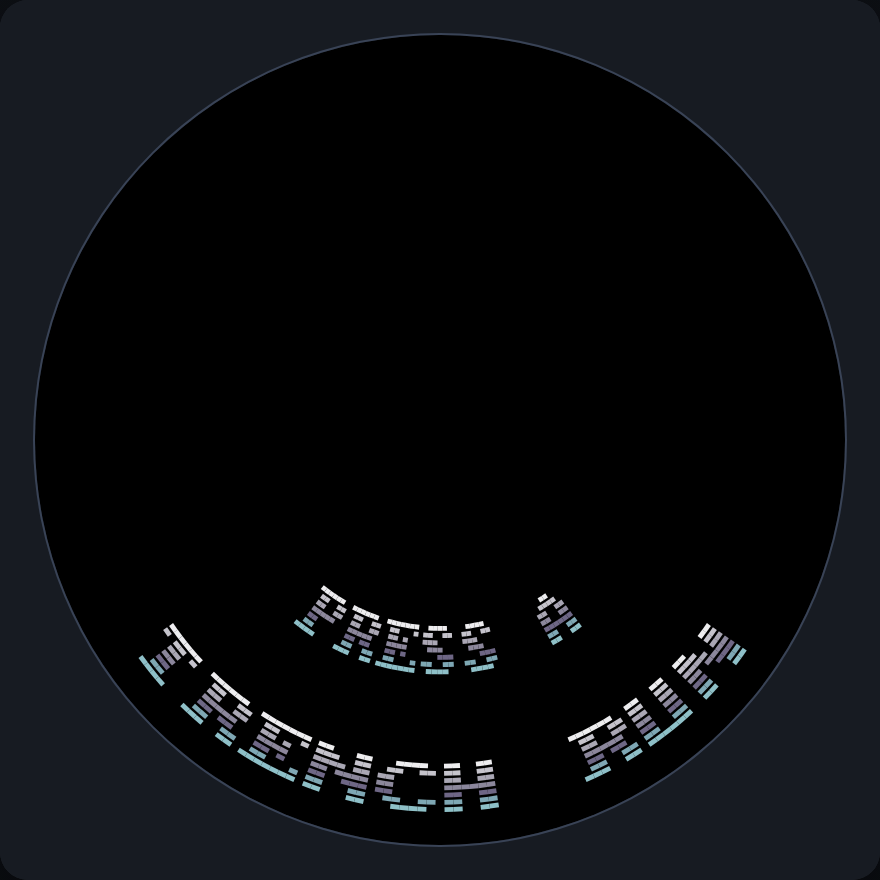
The title screen, before any score has been saved.
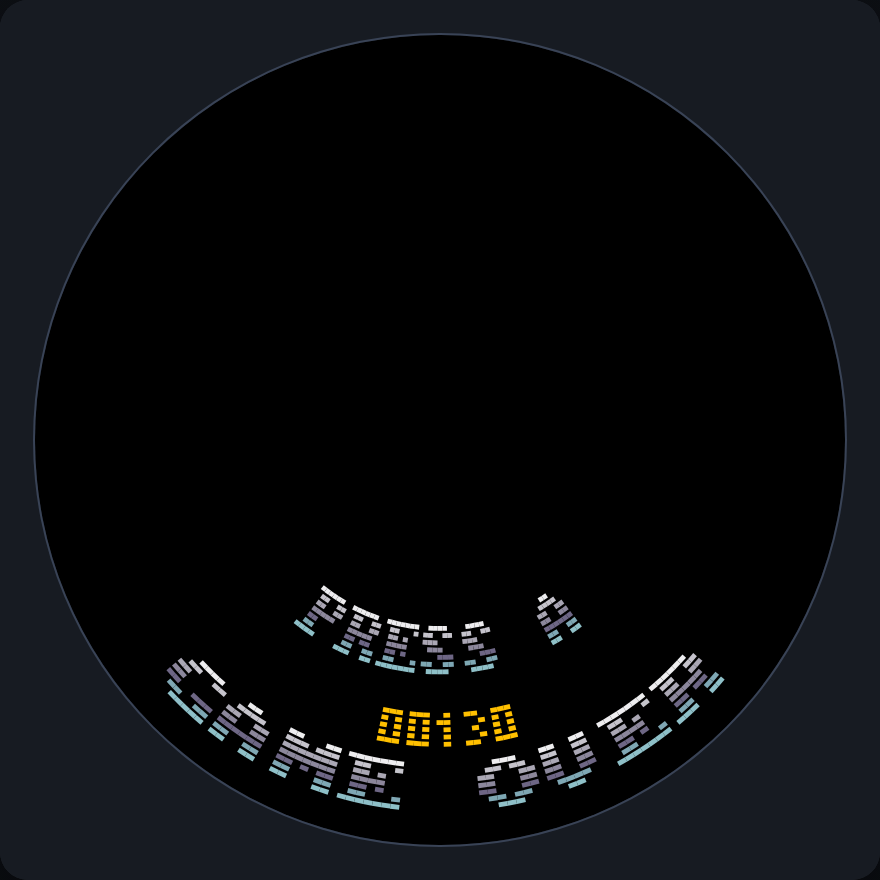
The game-over screen, here after 13 enemies dodged (130 points) short of a saved best of 250. Beating it would replace GAME OVER with NEW BEST!.
The whole game
This is the finished file, exactly as it is in
games/demos/tutorial_game/code/tutorial_game.py. The complete file at the end
of each earlier chapter is in docs/vs2/tutorial/steps/, so you can compare
yours with a working one at every stage.
"""The small game that the VS2 tutorial builds, chapter by chapter.

Trench Run: fly the ship around the rim and dodge the enemies that come down the
tunnel at you. Every enemy that gets past scores; one that touches the ship ends
the game. The best score is kept between runs, and the game speeds up (and gets
busier, in turn) as the score rises. See docs/vs2/tutorial/.
"""

from urandom import randrange

import vs2
from vs2.controls import *

LEVEL, TURN_LEFT, TURN_RIGHT = range(3)      # the frames of ship.png
ENEMY_START = 160    # depth at which enemies appear
POINTS = 10

# How fast the wall scrolls past, in depth units per tick. Enemies sit still in
# the trench, so they come at the ship at the same speed.
START_SPEED = 0.75
MAX_SPEED = 1.5
SPEED_STEP = 0.125

# Milliseconds between enemies.
SPAWN_MS = 900
MIN_SPAWN_MS = 450
SPAWN_STEP = 75

# The game gets harder every STEP_POINTS points, alternately by speeding the
# trench up and by sending enemies more often.
STEP_POINTS = 50
BEST = "best"        # the name the best score is saved under

# The trench's tiles, in the order they appear in trench.png.
PLATE, SEAM, PIPE, WINDOWS, VENT, HAZARD, LIGHTS, CONDUIT = range(8)
TRENCH_COLUMNS = 16  # around the tunnel
TRENCH_ROWS = 16     # along it
PATTERN_ROWS = 6     # the wall repeats every 6 rows, so it can scroll forever


def trench_tile(col, band):
    """Which tile goes at ``col`` in row ``band`` of the repeating pattern."""
    if band == 0:
        return PIPE
    if band == 4:
        return CONDUIT
    if band == 2:
        if col % 4 == 1:
            return WINDOWS
        if col % 4 == 3:
            return VENT
    if band == 5:
        if col % 8 == 2:
            return LIGHTS
        if col % 8 == 6:
            return HAZARD
    return SEAM if col % 2 else PLATE


class Game(vs2.Scene):
    def build(self):
        self.world = self.layer("world", projection=vs2.TUNNEL)
        self.hud = self.layer("hud", projection=vs2.HUD)

        # The trench wall: dark plating all the way round, with a few lit
        # structures. Its pattern repeats every PATTERN_ROWS rows.
        self.ground = self.world.tilemap(
            "trench.png", columns=TRENCH_COLUMNS, rows=TRENCH_ROWS,
            view_width=256, view_height=160)
        self.draw_trench()

        # x = 0 is the bottom of the disc. A sprite's x is its edge, so back up
        # by half its width to put the ship's centre there.
        self.ship = self.world.sprite("ship.png", y=0)
        self.ship.x = -(self.ship.width // 2)
        self.enemies = self.world.sprite_pool("enemy.png", count=16)

        # Top of the disc, where x = 128. Text up there is upside-down unless it
        # is flipped both ways.
        self.score_label = self.hud.label("numerals.png", columns=5, x=118, y=1,
                                          flip_x=True, flip_y=True)

        self.score = 0
        self.scroll = 0                 # how far the wall has scrolled
        self.ticks = 0
        self.show_score()
        self.get_harder()
        self.call_later(self.spawn_ms, self.spawn_enemy)

    def draw_trench(self):
        for row in range(TRENCH_ROWS):
            for col in range(TRENCH_COLUMNS):
                self.ground[col, row] = trench_tile(col, row % PATTERN_ROWS)

    def show_score(self):
        self.score_label.set_number(self.score, width=5, pad="0")

    def update(self):
        self.ticks += 1

        # +1 for left, -1 for right, 0 for neither (or both held: they cancel).
        # At the bottom of the disc x counts up toward the left.
        steer = joy1.held(LEFT) - joy1.held(RIGHT)
        self.ship.x = (self.ship.x + steer) % vs2.display.width
        if steer > 0:
            self.ship.frame = TURN_LEFT
        elif steer < 0:
            self.ship.frame = TURN_RIGHT
        else:
            self.ship.frame = LEVEL

        # Scroll the wall toward the ship. After one whole pattern the picture
        # is the same again, so the view can wrap without rewriting any cells.
        pattern_height = PATTERN_ROWS * self.ground.tile_height
        self.scroll = (self.scroll + self.speed) % pattern_height
        self.ground.view_y = self.scroll

        if self.move_enemies():
            vs2.audio.sound("boom")
            return self.switch(GameOver(self.score))

    def move_enemies(self):
        """Advance the enemies. Returns True if one touched the ship."""
        for enemy in self.enemies:
            enemy.y -= self.speed
            enemy.frame = (self.ticks // 6) % enemy.image.frames
            if enemy.overlaps(self.ship):
                return True
            if enemy.y < -enemy.image.height:
                self.enemies.despawn(enemy)      # flew past the ship
                self.score += POINTS
                self.show_score()
                self.get_harder()
        return False

    def get_harder(self):
        """Set the pace from the score. The steps alternate: the first, third,
        fifth... make the trench faster, the second, fourth... make the enemies
        come more often, each up to a limit."""
        step = self.score // STEP_POINTS
        self.speed = min(MAX_SPEED, START_SPEED + SPEED_STEP * ((step + 1) // 2))
        self.spawn_ms = max(MIN_SPAWN_MS, SPAWN_MS - SPAWN_STEP * (step // 2))

    def spawn_enemy(self):
        self.enemies.spawn(x=randrange(vs2.display.width), y=ENEMY_START)
        self.call_later(self.spawn_ms, self.spawn_enemy)


def centred_label(layer, text, y):
    """A label for ``text``, centred on the bottom of the disc, where it reads
    upright. steel8x8.png is a full CP437 font, 8 columns per character."""
    label = layer.label("steel8x8.png", columns=len(text), x=0, y=y, text=text)
    label.x = -(len(text) * label.image.width) // 2
    return label


class Title(vs2.Scene):
    def build(self):
        hud = self.layer("hud", projection=vs2.HUD)
        centred_label(hud, "TRENCH RUN", y=1)
        best = vs2.saves.load(BEST, 0)
        if best:
            centred_label(hud, "BEST %05d" % best, y=11)
        centred_label(hud, "PRESS A", y=20)

    def update(self):
        if joy1.just_pressed(A):
            self.switch(Game())


class GameOver(vs2.Scene):
    def __init__(self, score):
        vs2.Scene.__init__(self)
        self.score = score
        # Saved once, here, when the game ends. Writing flash is slow, so it is
        # done only when the record is beaten, never while playing.
        self.best = vs2.saves.load(BEST, 0)
        self.new_best = score > self.best
        if self.new_best:
            self.best = score
            vs2.saves.save(BEST, score)

    def build(self):
        hud = self.layer("hud", projection=vs2.HUD)
        centred_label(hud, "NEW BEST!" if self.new_best else "GAME OVER", y=1)
        score = hud.label("numerals.png", columns=5, x=246, y=11)
        score.set_number(self.score, width=5, pad="0")
        centred_label(hud, "PRESS A", y=20)

    def update(self):
        if joy1.just_pressed(A):
            self.switch(Game())


def main():
    return Title()
Next: budgets and real hardware.