4. Sprite pools
Enemies, bonuses and sparks come and go. You cannot create them on the fly — the scene is sealed — so you reserve a pool of them up front and cycle through it.
The reason is the hardware. Every new object takes memory from MicroPython’s
heap, and when a sprite is thrown away, its memory stays in use until the
garbage collector finds it. On the console the
collector only runs when a scene starts or ends, so a game that makes a sprite
for every enemy would pile up garbage tick after tick, and a long game could run
out of memory before the next scene change. (The desktop emulator collects
automatically, so there it would pause instead.) A pool makes the sprites once,
in build(), and then lends them out and takes them back, so spawning an enemy
allocates nothing:
def build(self):
    world = self.layer("world", projection=vs2.TUNNEL)
    self.enemies = world.sprite_pool("enemy.png", count=16)
That is 16 of your 100 sprites, spent in one number you can add up.
Every sprite starts hidden. Spawning reuses these reserved sprites instead of creating new render objects; unrelated Python expressions can still allocate.
Spawning
Spawning with spawn() takes a free
sprite, positions it, shows it, and hands it back:
enemy = self.enemies.spawn(x=100, y=160)
When the pool is empty it returns None, because “no free enemy this time” is a
game rule, not an error:
enemy = self.enemies.spawn(x=..., y=...)
if enemy is None:
    return          # the tunnel is already full; skip this one
For sparks and particles, dropping one looks worse than cutting another short,
so pass on_empty=vs2.RECYCLE when you create the pool, for example
world.sprite_pool("spark.png", count=32, on_empty=vs2.RECYCLE), and an exhausted
pool will recycle its oldest live sprite instead of returning None.
Despawning and iterating
Iterating a pool yields only the live sprites, and despawning the current one mid-loop is supported — which is exactly what the common loop needs:
SPEED = 0.75

def update(self):
    for enemy in self.enemies:
        enemy.y -= SPEED                       # toward the player, at the rim
        if enemy.y < -enemy.image.height:
            self.enemies.despawn(enemy)        # gone past the rim: retire it
On a TUNNEL layer the rim is y = 0, so something coming toward the player
counts down in Y, and the cutoff is a depth you choose — see
the circular display.
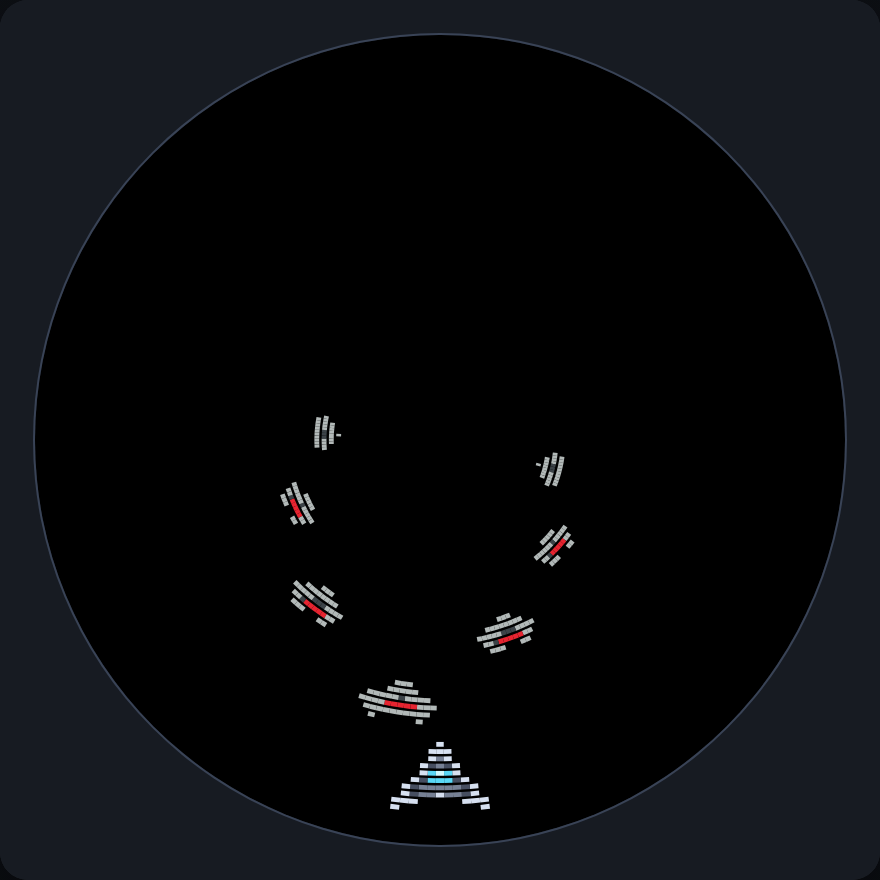
Seven enemies spawned from a pool, at different depths, heading for the ship.
despawn_all() clears a pool in one call, which is the
usual way to reset a level:
def start_wave(self, n):
    self.enemies.despawn_all()
    ...
Counting
len(self.enemies)        # live count
self.enemies.free        # how many are left to spawn

if not len(self.enemies):
    self.next_wave()
Both are O(1).
What the errors mean
Despawning a sprite twice, or handing a pool a sprite from a different pool, raises:
ValueError: sprite is not live in this pool
That is always a bookkeeping bug — usually a sprite despawned in two branches of
the same if. It is worth failing on, because the alternative is a sprite that
is quietly in both the free list and the live list.
In the game
Time for something to dodge. Add a pool of enemies to build(), with a few of
them already spawned (a timer will spawn them properly in chapter 6):
SPEED = 0.75         # depth units per tick, toward the ship
ENEMY_START = 160    # depth at which enemies appear


def build(self):
    # ... the layer and the ship, as before ...
    self.enemies = self.world.sprite_pool("enemy.png", count=16)
    for i in range(5):
        self.enemies.spawn(x=i * 51, y=ENEMY_START)
    self.ticks = 0                              # counts update() calls
Then update() moves them:
def update(self):
    self.ticks += 1
    # ... steering, as before ...
    self.move_enemies()

def move_enemies(self):
    for enemy in self.enemies:
        enemy.y -= SPEED
        enemy.frame = (self.ticks // 6) % enemy.image.frames
        if enemy.y < -enemy.image.height:
            self.enemies.despawn(enemy)      # flew past the ship
Enemies move toward the ship by counting y down, because the ship is at
the rim. Speeds here are per tick, and a tick is about 30 ms, so 0.75 per tick
means an enemy takes a little over six seconds to come down from y = 160. That is the
arithmetic to do when you tune a speed. The same applies to animation: to change
frame at a pace you can see, count the ticks and change frame every few of them
instead of on every one: self.ticks // 6 stays the same for six ticks in a row,
so the enemy changes frame six times more slowly than update() runs.
enemy.image.frames supplies the number of frames, so the line keeps working if
you add one to the PNG.
For now an enemy that reaches the ship simply flies through it; chapter 6 makes that end the game, and chapter 5 scores the ones you avoid.
The file so far
Everything from this chapter in one file, as it stands after chapter 4. If yours misbehaves, compare it
with this one. It is docs/vs2/tutorial/steps/step4_pools.py in the repository.
# Trench Run, chapter 4: enemies come down the tunnel.
import vs2
from vs2.controls import *

LEVEL, TURN_LEFT, TURN_RIGHT = range(3)      # the frames of ship.png
SPEED = 0.75         # depth units per tick, toward the ship
ENEMY_START = 160    # depth at which enemies appear


class Game(vs2.Scene):
    def build(self):
        self.world = self.layer("world", projection=vs2.TUNNEL)
        self.ship = self.world.sprite("ship.png", y=0)
        self.ship.x = -(self.ship.width // 2)     # centred on x = 0, the bottom of the disc
        self.enemies = self.world.sprite_pool("enemy.png", count=16)
        for i in range(5):
            self.enemies.spawn(x=i * 51, y=ENEMY_START)
        self.ticks = 0                              # counts update() calls

    def update(self):
        self.ticks += 1

        # +1 for left, -1 for right, 0 for neither (or both held: they cancel).
        # At the bottom of the disc x counts up toward the left.
        steer = joy1.held(LEFT) - joy1.held(RIGHT)
        self.ship.x = (self.ship.x + steer) % vs2.display.width
        if steer > 0:
            self.ship.frame = TURN_LEFT
        elif steer < 0:
            self.ship.frame = TURN_RIGHT
        else:
            self.ship.frame = LEVEL

        self.move_enemies()

    def move_enemies(self):
        for enemy in self.enemies:
            enemy.y -= SPEED
            enemy.frame = (self.ticks // 6) % enemy.image.frames
            if enemy.y < -enemy.image.height:
                self.enemies.despawn(enemy)      # flew past the ship


def main():
    return Game()
Next: tilemaps and text.