7. Budgets and real hardware
The console has on the order of 8 MB of RAM shared between MicroPython’s
heap, the image strips and the interpreter, and a hard deadline every
column. The budgets exist so you find out at build()
rather than mid-game.
Resource |
Budget |
Notes |
|---|---|---|
Layers |
8 |
Most games use two or three |
Sprites |
100 |
Pools count in full, up front |
Tilemaps |
16 |
A label counts as one |
Image strips |
100 |
Per asset pack |
Read them at runtime from vs2.limits — see
vs2.limits.sprites and its neighbours in the
reference.
Reading the errors
Every one of these is raised the first time the scene is entered, never later:
ResourceLimitError: sprite 101/100 in Vixeous (world: 62, hud: 39);
  reduce the sprite budget
The census names every layer holding sprites, so the oversized one is visible without counting by hand.
ResourceLimitError: tilemap 17/16 in Game (world: 14, hud: 3);
  reduce the tilemap budget
Remember labels land here, not in the sprite budget.
AssetLimitError: myname.mygame defines 103 images; this target supports 100
Too many strips in __images__.yaml. Combine related art into one strip with
more frames.
Staying inside them
Text belongs in labels. Three lines of text as one sprite per character cost 54 of 100 slots. As three labels they cost three tilemap records, and the cost does not grow with the text.
Pools, not lists. A sprite_pool(count=16) states its cost in one number
that shows up in the census. Sixteen individually created sprites do not.
Cell data, not sprites. Anything on a grid — terrain, a starfield, a tile-based background — is one tilemap record however many cells it has.
Keep update() free of allocation
Creating a tuple, dict or formatted string every tick adds up to garbage that stays on the console’s small heap until the next scene change. These operations reuse existing render objects. That does not guarantee that the surrounding Python expressions allocate nothing; the reasons are in why VS2 works this way.
sprite.x += 0.5
sprite.frame = 3
pool.spawn(x, y)
pool.despawn(enemy)
tilemap.view_y = depth % tilemap.tile_height
tilemap.cells[row * tilemap.columns + col] = WINDOWS
label.set_number(score, width=5)
joy1.held(LEFT)
The convenient tilemap[col, row] syntax creates a tuple when the indices are
computed at runtime. For frequent writes, use the direct cells buffer as above;
validate the row, column and tile value yourself, since it bypasses checked indexing.
See direct cell writes. Sealing limits render-object
creation, not all Python allocation. Measure heap stability on the target.
Moving to the console
The emulator and the console run the same renderer semantics, so a game that looks right in the emulator generally looks right on the disc. Three things only the real thing tells you:
Timing. The emulator does not enforce the per-column deadline. A scene near the tilemap budget with several large maps is worth watching on hardware.
Legibility. The 256 angular steps are spread around a large circumference at
the rim and crammed into almost nothing at the centre, so the same glyph is
crisp near the rim and unreadable near the middle. Text belongs at low Y on
a HUD layer — the in-tree games put their scoreboards at y=0 or y=1.
Nothing warns you about this; you have to look at it:
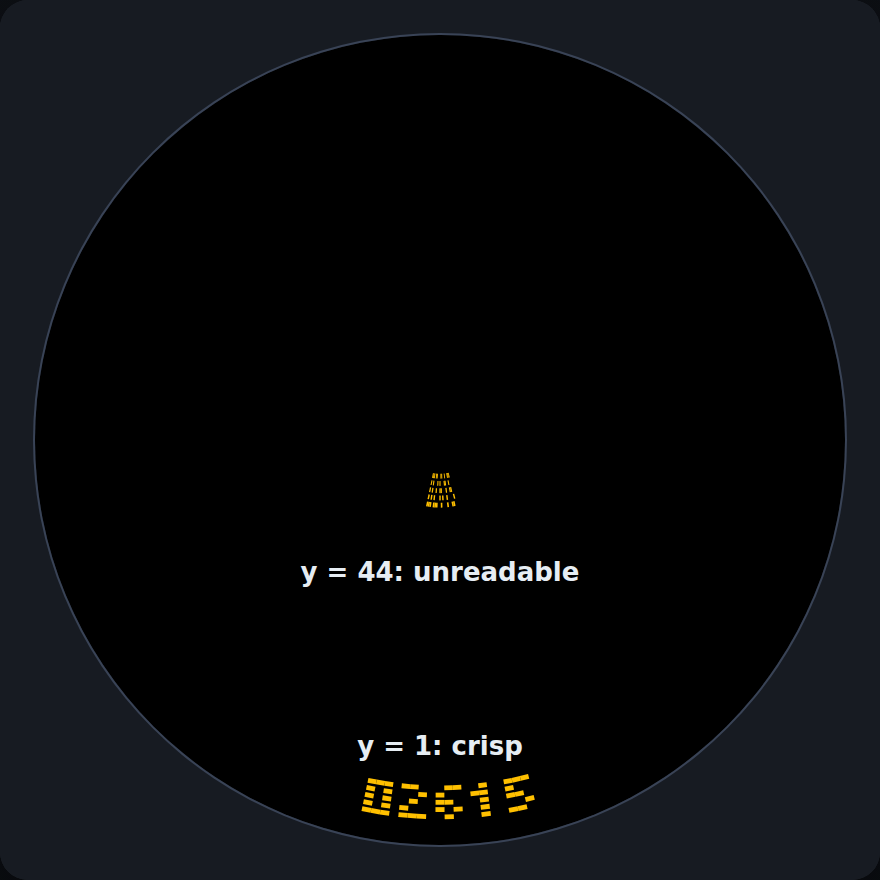
The same label at y = 1 and at y = 44.
Backgrounds, colours and intensity. Dark or black backgrounds work better on
the real Ventilastation than bright ones. Leave empty space empty — EMPTY_TILE
cells and transparent pixels draw nothing — and keep any backdrop you do draw
dark. A tilemap that lights the whole disc in bright colours is the exception, which
is why the trench tiles in chapter 5 are near-black. How a colour looks on a monitor is not how it looks
on the LEDs, and the emulator cannot judge their intensity for you, so always
test your colours and intensities on the real hardware and adjust them there.
Do it before you share a game, not after.
In the game
Add up Trench Run’s budget. The numbers are in vs2.limits:
Resource |
Used by the game scene |
Budget |
|---|---|---|
Layers |
2 ( |
8 |
Sprites |
1 ship + 16 enemies = 17 |
100 |
Tilemaps |
1 trench wall + 1 score label = 2 |
16 |
Image strips |
5 (ship, enemy, trench, numerals, steel8x8) |
100 |
Everything is created in build(), so the whole table is checked the first time
the scene is entered. The complete game is at the end of
chapter 6.
Run it in the emulator, then run it on the real Ventilastation. The trench, the score and the title should all look the way they did on screen, but only the disc will tell you whether the colours are comfortable and the text is crisp.
Packaging
Follow assets, menu and sharing to package your game or submit its source folder as a pull request.
Where to look next
The API reference for the full surface, and the glossary for any term you have forgotten.
Going further for features this tutorial skipped.
Real games in the tree:
games/demos/input_demoshows every control, andgames/alecu/vixeoususes pools, a scrolling terrain map and labels together.games/demos/povstressis the stress case, deliberately near the budgets.