Scenes
A scene is one screen of a game. Subclass vs2.Scene, build the
display graph in build(), and drive it in
update().
Lifecycle
build() runs on every entry, and when it returns the scene is sealed:
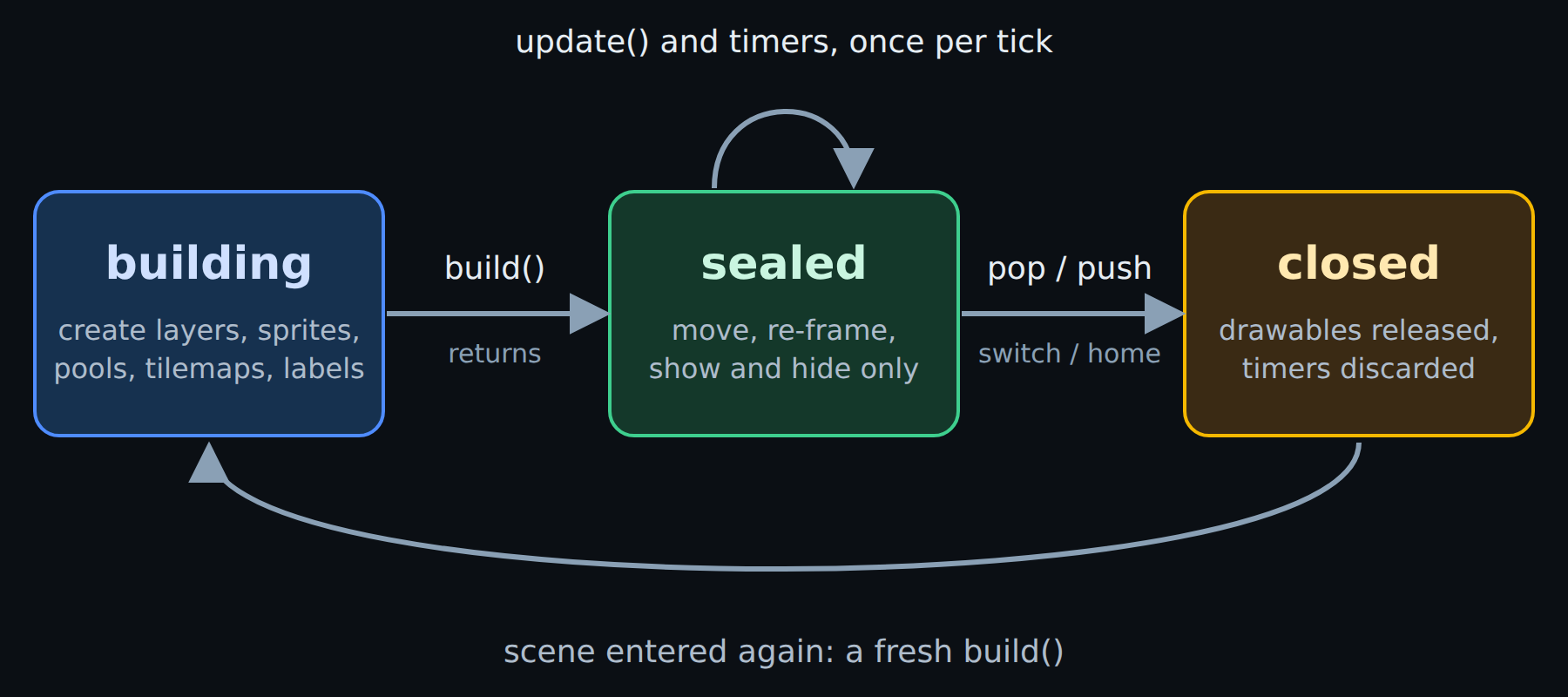
The scene lifecycle.
While building, layers and drawables may be created. Once sealed, they may
only be moved, re-framed, shown and hidden — any structural call raises
vs2.SceneSealedError. Once closed, drawables are released and
pending timers discarded, so a scene shown again always starts from a fresh
build().
Persistent state can live in __init__, which runs once for the life of the
object. Drawable handles cannot: rebuild them in build().
Transitions
All three are transitions. They queue and commit at the end
of the tick, and all three return None, so return self.pop() reads as
“handle this input, then stop”:
self.push(PauseMenu())        # suspend this scene, run another on top
self.pop()                    # resume the scene below, or exit the app
self.switch(GameOver(score))  # replace this scene outright
Once a transition is queued, no further game callbacks run that tick: if
update() queued it the timer drain is skipped, and if a timer callback queued
it the drain stops there. A timer coming due on the same tick as a game-over can
therefore never poke a scene that has already decided to leave. Only one
transition may be queued per tick; a second raises.
Class reference
- class vs2.Scene[source]
Bases:
SceneOne screen of a game: a display graph plus the logic that drives it.
Subclass it, build the graph in
build(), and move it inupdate():class MyGame(vs2.Scene): def build(self): self.world = self.layer("world", projection=vs2.TUNNEL) self.ship = self.world.sprite("ship.png", x=128, y=0) def update(self): self.ship.x += 0.5
The scene has three phases. During
build()it is building and layers and drawables may be created. Whenbuild()returns it is sealed:update()and timers may move, re-frame and hide what exists, but any structural call raisesSceneSealedError. When the scene stops showing it is closed, its drawables are released, and pending timers are discarded.build()runs on every entry, so a scene shown a second time starts from a fresh graph. Persistent state — scores, progress, unlocked levels — can live in__init__, which runs once; drawable handles must be rebuilt.- idle_timeout = 30
Seconds without input from any controller before
on_idle()fires.Nonedisables the timeout. Defaults to 30 so an unattended console always drifts back to the launcher’s attract loop.
- back_button = True
When true,
YorBACKpops the scene. Set it toFalseto claim those buttons for gameplay; the scene stays exitable through the idle timeout and the console’s home command.
- starfield = False
When true, the drifting starfield is drawn behind this scene. Applied on entry; a scene that leaves it false has no stars, whatever came before. (Scenes written for the older sprite API always have them.)
- asset_pack = None
Name of the asset pack to load, defaulting to the current app’s own. Shared and system scenes set this to borrow another pack.
- build()[source]
Create this scene’s layers and drawables. Override this.
Runs on every entry to the scene. When it returns the scene is sealed, so this is the only place
layer()and theLayerfactories may be called.
- update()[source]
Advance the game by one tick. Override this.
Called once per rotation of the display. It may move, re-frame, show and hide the drawables built in
build(), but may not create more.
- teardown()[source]
Clean up when the scene stops showing. Optional.
Saving a score or cancelling external work belongs here. Timers and drawables are released for you, so most scenes never need it.
- image(value)[source]
Resolve an image name to an
Imagehandle.Handles are cached for the life of the scene, so resolving the same name twice returns the same object. Passing an
Imagereturns it unchanged, which lets factories accept either form.- Parameters:
value – An image name such as
"ship.png", or anImage.- Returns:
Image – The resolved handle.
- Raises:
AssetNotFoundError – If the name is not in the scene’s asset pack.
- layer(name=None, projection=1, visible=True)[source]
Create a layer. Only callable from
build().Layers paint bottom to top in the order they are created, so create the background first and the HUD last.
- Parameters:
name – A label used in resource-limit messages. Worth setting.
projection –
TUNNEL,HUDorFULLSCREEN. Decides how the layer maps Y to LEDs.visible – Whether the layer draws at all.
- Returns:
Layer – The new layer, ready to create drawables on.
- Raises:
SceneSealedError – If called outside
build().ResourceLimitError – If the scene already has
vs2.limits.layers.
- call_later(delay, callback, *args, **kwargs)[source]
Schedule a one-shot callback
delaymilliseconds from now.Extra positional and keyword arguments are stored with the timer and passed to the callback when it fires:
self.call_later(1500, self.respawn)
self.call_later(500, self.spawn_wave, wave, boss=True)
Timers live only as long as the scene is showing. Pending callbacks are discarded the moment it stops showing — popped, or suspended under a
push()— and a scene shown again starts from a freshbuild()with no timers.Scheduling is meant to be infrequent: menus, respawn delays, wave timers. Do not call this every tick.
- Raises:
SceneSealedError – If the scene is not building or running.
- push(scene)[source]
Suspend this scene and run
sceneon top of it.This scene’s timers are discarded and its drawables released; when the pushed scene pops, this one is entered again from a fresh
build().
- pop()[source]
Leave this scene, resuming the one below, or exit to the launcher.
Returns
None, soreturn self.pop()reads as “handle this input, then stop”. No V2 scene raisesStopIteration.
- switch(scene)[source]
Replace this scene with
scene, without growing the stack.Music and base-hardware state carry over, since both follow the app rather than the scene.
- on_idle()[source]
Called after
idle_timeoutseconds without input.The default pops the scene, so an unattended console walks back out to the launcher one screen at a time. Override it for an attract loop:
def on_idle(self):
    self.push(AttractSlideshow())